![Ritter Communications all white (no background).png]](https://help.rittercommunications.com/hs-fs/hubfs/Logos/Ritter%20Communications%20all%20white%20(no%20background).png?height=39&name=Ritter%20Communications%20all%20white%20(no%20background).png)
Network names can be changed on the Plume Home app for easier identification.
- Open the Plume Home app.
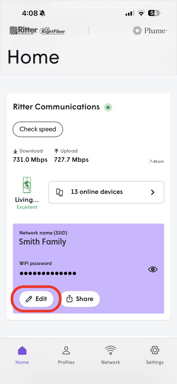
- On the Home tab, click on Edit in the network information section.
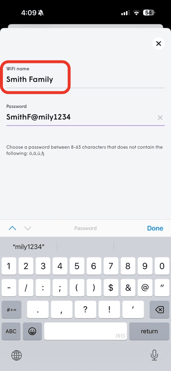
- Then click in the WiFi name text box to edit the SSID, or network name.
Your WiFi will now be discoverable under the new name.
Don't have the Plume Home app? Contact us to upgrade to Smart WiFi!